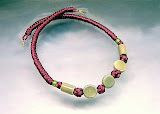
While we are on the subject of knotting (actually knotting makes me happier than...well, chocolate, but try wearing that), this is a necklace with double Button knots, two single Button knots, and the Snake knot. And of course, very large holed beads.
The Snake knot is aptly named. It consists of two cords that wind around and around each other. The double Button knot is a test of patience and manual dexterity; it's made the same as the single knot but you run the second cord around and through, next to the first cord. (Or you can tie with two cords at once and be very careful to keep the two cords laying flat, around and around the knot.) Note: two cords run the full length. This means the single Button knot has a cord running through the middle of it. And, both cords run through the large holed beads. And in case anyone wants to know, I use nylon rattail from www.satincord.com. Again, Suzen Millodot's "Chinese Knots for Beaded Jewellery" has great instructions.
If you look carefully at the picture you will notice that it looks almost like a painting. And this brings me to the subject of this post: overuse of photo editing programs. There are many excellent photo editing programs out there. You are limited only by your pocketbook. The hard part is knowing when to stop!
Now, I started out with a simple pic of the necklace. The background was wrinkled (plastic, I think) so I "smudged" all those little lines. (Sadly, life has no "smudge" function.) I have an art background and found I could put in some really nice "brush strokes". And, put in more shadows. And add a bit of character to the empty space around the necklace. (Rembrandt couldn't do better). Enhanced the colors a bit, more warmth, more red, and got the green a better shade. Sharpened up the edges a bit. Oops, color bleeds into the white. A little more smudging.
I did this about three months ago. I know much more these days.
There are some important things to know in order to make a good photograph.
Briefly: a digital camera with at least 4 mega-pixels resolution and macro mode (really CLOSE up pics), good lighting (very hard to get right), a tripod, and lots of patience (and maybe a very colorful vocabulary, "colorful", get it? Oh well).
And the most important: the know-how. All the editing software in the world can't make a bad pic into a great pic (in my case, since my aim is to sell what I'm making, the pic has to be reeeal gooood). You can Google digital photography. Www.tabletopstudio.com and www.createapendant.com are two that come to mind. The info and tutorials are excellent. If anything, I have learned: the best camera and the best editing software can't make up for knot knowing when to stop. (Oh dear, too many knot jokes, I do knot know when to stop.)
That's all for tonight. Braids next time!


